Bilt credits and capturing
Bilt is the fullest end-to-end tour of Benefits variants on one issuer family: an earn-bonus housing setup (with monthly tracking), semiannual hotel spend credits, an annual spend-pool slider, and (on Palladium) Priority Pass as an assignable passive.
Add the card in Wallet first. Multipliers and dining toggles live on Wallet card Details; Benefits tracks claims and attribution only.
What’s on each Bilt card
Section titled “What’s on each Bilt card”| Card | Annual fee | Benefits on Benefits |
|---|---|---|
| Bilt Blue | $0 | Housing Rewards (earn bonus) |
| Bilt Obsidian | $95 | Housing + Bilt Travel Hotel Credit $100/yr (H1 $50 + H2 $50) |
| Bilt Palladium | $495 | Housing + Hotel $400/yr (H1/H2 $200) + Annual Bilt Cash $200 + Priority Pass Select (Accept suggested / Set my value) |
Chaseable statement credits (spend-credit pool): Blue $0 · Obsidian $100 · Palladium $600 (hotel + Cash).
Attribution (not the unused-credit slider): Housing Rewards once set up, and Priority Pass once you accept or set a value. Those dollars count toward Claimed via points/CPP or your assigned annual value — they are not statement-credit capture.
Feature matrix (every variant)
Section titled “Feature matrix (every variant)”| Variant | Where | Capture path |
|---|---|---|
| Earn-bonus Needs setup | Housing on all three | Amber Needs setup · CTA Set up · no chaseable $ yet |
| Earn-bonus setup modal | Same | Rent $ + rate radios → preview pts/$ → I pay housing with Bilt |
| Earn-bonus tracked series | After setup | J–D pills · Edit rent / rate · Stop tracking housing · Hide |
| Semiannual H1/H2 series | Hotel (Obsidian, Palladium) | Pill → drawer · amount + slider · Mark all $X used |
| Open half partial / full | Hotel drawer | Drag slider or full-mark; chip Captured in full / partial |
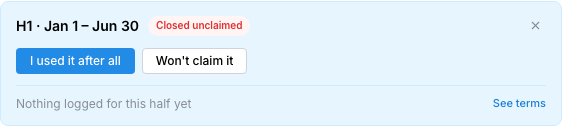
| Closed unclaimed | Past H1 (e.g. Aug asOf) | I used it after all · Won’t claim it |
| Won’t claim this half | Open hotel drawer | Write-off that half; undo via Put it back on the table |
| Annual spend slider | Bilt Cash (Palladium) | Dollar field + slider · full capture · Won’t claim it |
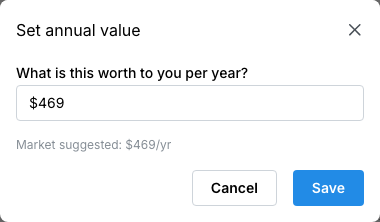
| Passive assign value | Priority Pass (Palladium) | Accept suggested (~$469) · Set my value · Don’t count |
| Passive counting | Valued PP under Active | $X/yr · Change value · Don’t count · Hide |
| Net-of-fee header | Obsidian / Palladium | Captured − fee; Blue shows no-fee upside copy |
| Hide benefit | Any series/row | Stops counting toward net until you put it back |
Bilt has no always-count monthly credits, no punch-card passives, and no anniversary points grants on these three cards.
1. Housing Rewards — earn bonus (Blue, Obsidian, Palladium)
Section titled “1. Housing Rewards — earn bonus (Blue, Obsidian, Palladium)”Same benefit on all three cards: Bilt Housing Rewards (rent & mortgage). Cadence is ongoing / monthly (twelve value periods). Until you finish setup it sits under Needs you with Needs setup.
Before setup
Section titled “Before setup”- Open Benefits → your Bilt card
- Find Housing Rewards — side copy I pay housing with Bilt / not counted until set up
- Meta: Monthly · earn (desktop adds not a statement credit)
- Tap Set up


Setup modal
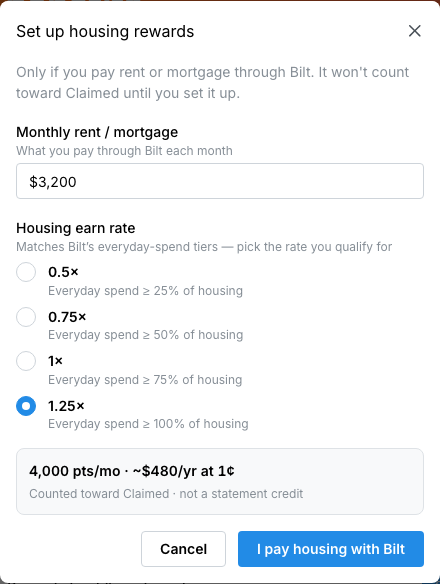
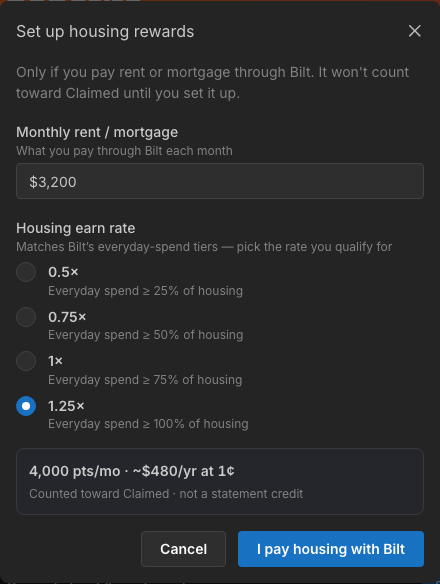
Section titled “Setup modal”Modal title: Set up housing rewards.
- Monthly rent / mortgage — what you pay through Bilt each month
- Housing earn rate — pick the Housing-only tier you qualify for:
| Rate | Hint in Flyga |
|---|---|
| 0.5× | Everyday spend ≥ 25% of housing |
| 0.75× | Everyday spend ≥ 50% of housing |
| 1× | Everyday spend ≥ 75% of housing |
| 1.25× | Everyday spend ≥ 100% of housing |
- Preview shows pts/mo and ~$X/yr at your Wallet CPP, with Counted toward Claimed · not a statement credit
- Confirm with I pay housing with Bilt
Open months fill from that rent/rate; upcoming months stay empty until they open (then use series defaults).
Issuer paths vs what Flyga tracks
Section titled “Issuer paths vs what Flyga tracks”Bilt’s own product offers Housing-only (the tiers above) or Flexible Bilt Cash (everyday Cash that can unlock housing earn). Flyga’s rate radios are the Housing-only tiers only — there is no Flexible-path picker in Benefits. If you use Flexible on the issuer side, still set rent/rate here so Claimed reflects the housing value you want to attribute. Keep earned points on the Bilt Wallet balance so CPP stays honest.
After setup — tracked monthly series
Section titled “After setup — tracked monthly series”- Badge Monthly · earn
- J–D month pills (green = attributed; amber = open but not tracked; grey = upcoming)
- Totals: $X attributed · N pts · N mo (or Tracking housing before dollars land)
- Tap a month → drawer with pts / rent / rate → Edit rent / rate (modal title becomes Edit housing for this month, confirm Save)
- Stop tracking housing clears attribution and returns the Set up CTA
- Hide removes the series from net until you put it back
After setup, the tracked series usually sits under the card’s Used disclosure (expand Show) rather than Needs you.


More on earn math: Points grants and earn bonuses.
2. Travel Hotel Credit — semiannual spend credit (Obsidian, Palladium)
Section titled “2. Travel Hotel Credit — semiannual spend credit (Obsidian, Palladium)”| Card | Per half | Annual | Value summary |
|---|---|---|---|
| Obsidian | $50 | $100 | $50 twice a year |
| Palladium | $200 | $400 | $200 twice a year |
Issuer terms: 2+ night stays booked in the Bilt Travel portal; credit can apply at booking or as a post-stay statement credit — verify current Bilt policy.
Series + open half
Section titled “Series + open half”- Expand the Bilt Travel Hotel Credit series
- Tap H1 or H2
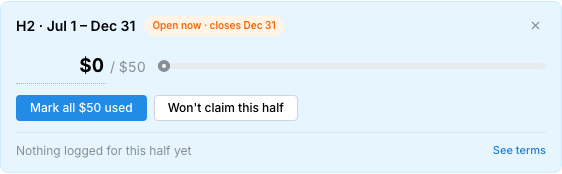
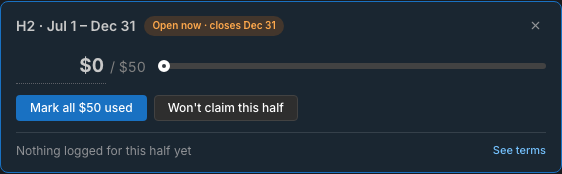
- In the period drawer: enter amount or drag the slider, or Mark all $X used
- Optional: Won’t claim this half to write off that window
Chips you’ll see: Open now · closes {date}, Captured in full, Closed unclaimed, Closed · partial capture, Written off. Footer notes when you logged capture and links See terms.


Missed / closed halves
Section titled “Missed / closed halves”If a half closed unused (e.g. H1 after Jun 30 while you’re in H2):
- I used it after all — capture after the window (overwrite)
- Won’t claim it — write off
Fully captured: Undo — not used. Written off: I used it after all or Put it back on the table.

Hide the whole hotel series if you don’t want it in fee math (same pattern as other spend credits).
3. Annual Bilt Cash — spend pool slider (Palladium only)
Section titled “3. Annual Bilt Cash — spend pool slider (Palladium only)”$200 annual spend credit (single period, not H1/H2). Capture like any large spend pool: dollar field + slider, mark fully used, or Won’t claim it.
Catalog notes (issuer-side, not modeled as rollover in Flyga): Cash deposits at open / each Jan 1; only $100 rolls year to year per Bilt’s rules — track what you actually redeemed this cycle in the slider.


4. Priority Pass Select — assignable passive (Palladium only)
Section titled “4. Priority Pass Select — assignable passive (Palladium only)”Finish Priority Pass with the issuer first (Palladium description: up to 2 guests — verify current policy). On Benefits the row is an assignable passive with a market suggestion — not a punch card and not a Housing-style Set up modal.
Actions under Needs you:
- Accept suggested — catalog market value (~$469/yr)
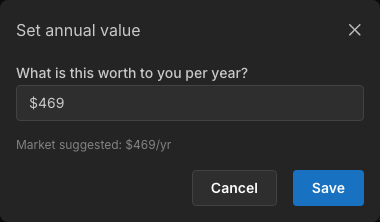
- Set my value — opens Set annual value (What is this worth to you per year?)
- Don’t count — leave it out of Claimed
Once counting: the row moves to Active (not Used) and shows $X/yr with market value or your value; Change value or Don’t count. Hide works like other assignables.


5. Fee math and scorecards
Section titled “5. Fee math and scorecards”| Card | Fee | Break-even story |
|---|---|---|
| Blue | $0 | No fee bar — header copy like No annual fee to clear / upside from housing attribution |
| Obsidian | $95 | Both hotel halves = $100 (~$5 headroom before housing) |
| Palladium | $495 | Hotel $400 + Cash $200 = $600 chaseable can clear the fee; housing + valued PP add attribution on top |
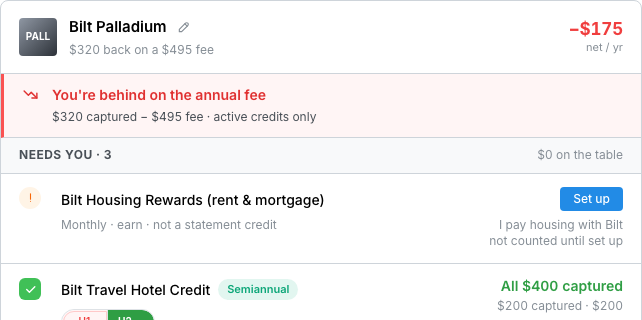
Card header net / yr = captured − fee for active credits. Paid cards may show You’re behind on the annual fee until capture catches up; summary lines look like $X captured − $Y fee · active credits only.
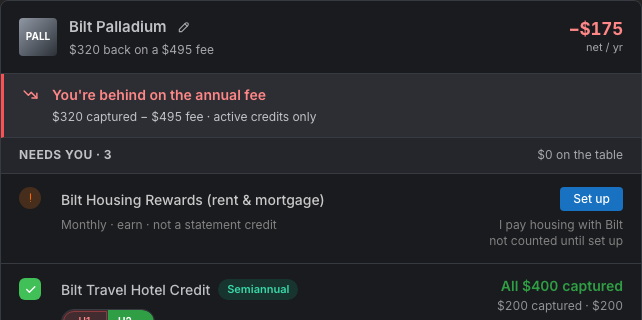
Portfolio Fees vs value you capture aggregates the same idea across cards — see Hide, write off, and scorecards.
Capture checklist by card
Section titled “Capture checklist by card”Blue ($0)
Section titled “Blue ($0)”- Set up Housing (rent + rate)
- Edit months when rent/rate changes; stop tracking if you leave Bilt housing
- Optional: hide housing if you don’t want it in Claimed
Obsidian ($95)
Section titled “Obsidian ($95)”- Housing setup (same as Blue)
- Capture H1 and H2 hotel halves ($50 each) — or overwrite / won’t claim if missed
- Clear the $95 fee with hotel + housing attribution
Palladium ($495)
Section titled “Palladium ($495)”- Housing setup
- Hotel H1/H2 ($200 each)
- Annual Bilt Cash slider ($200)
- Priority Pass: Accept suggested or Set my value (after issuer enrollment)
- Watch net/yr until chaseable $600 + attribution clears the $495 fee
Related: Tracking spend credits · Valuing lounges and other perks · Points grants and earn bonuses