Points grants and earn bonuses
Two benefit types turn into points instead of statement cash: points grants (fixed award) and earn bonuses (points from an amount you enter).
Points grants
Section titled “Points grants”Catalog points or miles — often on the card anniversary — valued automatically at the destination program’s cents-per-point.
Examples: Venture X 10,000 anniversary miles; Southwest anniversary points; Hilton Brilliant free-night awards; Quest / Atmos companion-style grants.


Apply to balance
Section titled “Apply to balance”When the grant is available, confirm it on the row (it counts toward Claimed via CPP). Optionally choose Apply to balance once per cycle to add those points to the matching Wallet program balance.
Earn bonuses — Bilt Housing Rewards
Section titled “Earn bonuses — Bilt Housing Rewards”Earn bonuses convert an input you provide into points at a chosen rate, then into dollars via CPP. The catalog example is Bilt Housing Rewards (rent & mortgage) on Blue, Obsidian, and Palladium.
Formula: rent dollars × earn rate → points → USD at Wallet CPP. Until setup finishes, the series contributes no chaseable statement dollars and sits under Needs you.
Set up housing rewards
Section titled “Set up housing rewards”- Open Benefits for your Bilt card
- Find Housing Rewards — Needs setup · I pay housing with Bilt / not counted until set up
- Choose Set up
- In Set up housing rewards:
- Monthly rent / mortgage
- Housing earn rate — 0.5× / 0.75× / 1× / 1.25× (hints match everyday-spend ≥ 25% / 50% / 75% / 100% of housing)
- Confirm the pts/mo and ~/yr preview
- Tap I pay housing with Bilt


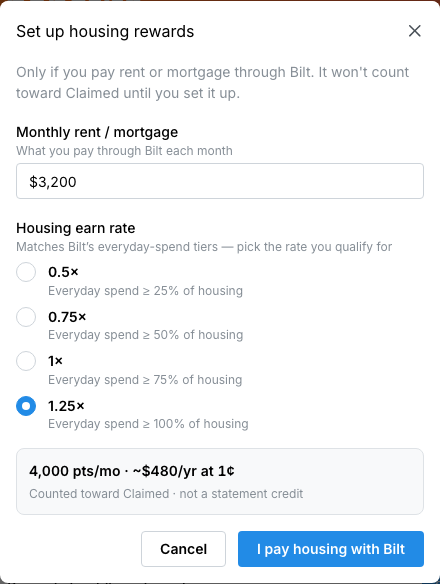
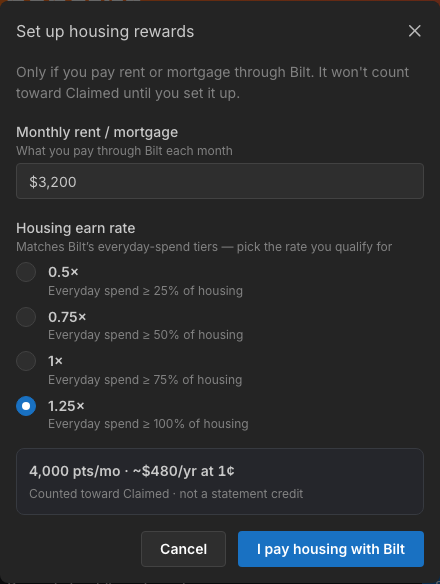
Flyga’s radios are the Housing-only tiers. Bilt’s separate Flexible Bilt Cash path is issuer-side only — see Bilt credits and capturing.
After setup — months, edit, stop
Section titled “After setup — months, edit, stop”- J–D pills show attributed vs open vs upcoming months
- Totals: attributed $ · points · months tracked
- Tap a month → Edit rent / rate (modal: Edit housing for this month / Save)
- Stop tracking housing clears setup and returns the Set up CTA
- Hide excludes the series from net-of-fee until restored
- Look under the card’s Used band (tap Show) once months are attributed


Full Bilt credit tour (hotel H1/H2, Bilt Cash, Priority Pass, fees): Bilt credits and capturing.